Why your CSP needs a runtime layer
7 min read

“Do we need a consent tool if we just build a Content Security Policy (CSP)?”
A CISO asked us that recently, and it's a fair question. A CSP is one of the best controls a browser gives you. But it's a static allowlist in a header, and modern sites change constantly. It can't see what an approved script does once it loads, and it doesn't govern where your users go.
Airgap is the runtime layer that fills that gap. It's the browser script behind Transcend's consent management, and it checks each request, script, cookie, and navigation before it happens. It also generates and maintains a CSP for you, built from the data flows your privacy team already keeps.
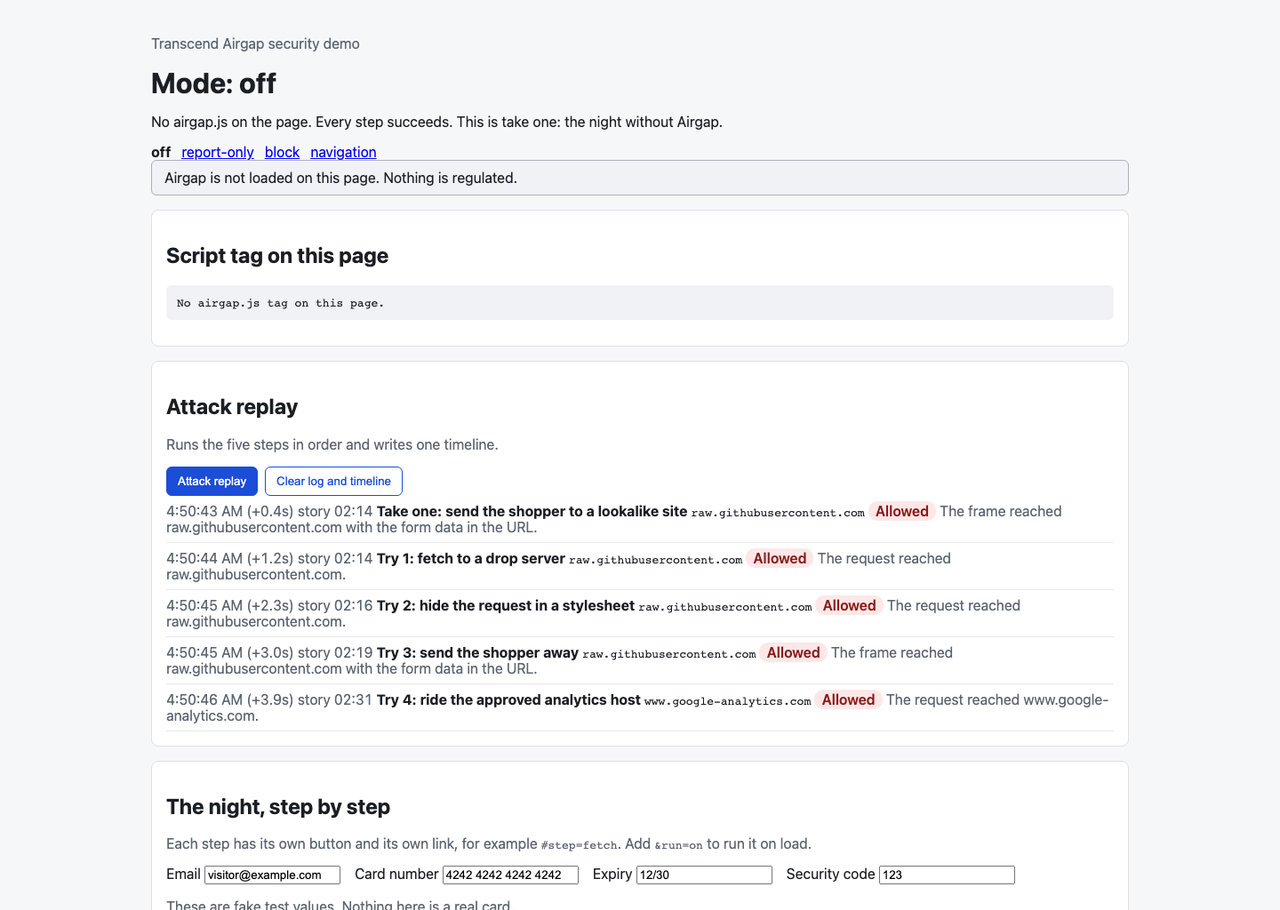
To show what that looks like in practice, here's one night at a checkout page. A trusted vendor script goes bad at 2 a.m. and tries four ways to get card data out. The story is a composite built from publicly documented skimming techniques. It doesn't describe a real store, customer, or breach.
02:14, the file changes
It is 02:14 a.m. on the Tuesday of Black Friday week.
Nobody at the store is awake. The checkout page is.
A shopper is on it right now. Full cart. Card in one hand, phone in the other, thumb over "Place order."
The page loads a few dozen scripts. All but one are the same as yesterday.
That one comes from a tag vendor your team approved two years ago. Same host. Same file name. A few new lines at the bottom.
Your Content Security Policy (CSP) is the guest list at the door. It tells the browser which hosts the page may talk to. The vendor's host is on the list. The browser checks the name and lets the script in. A guest list has no opinion about what a guest does inside.
You are asleep. You will find out at 08:05.
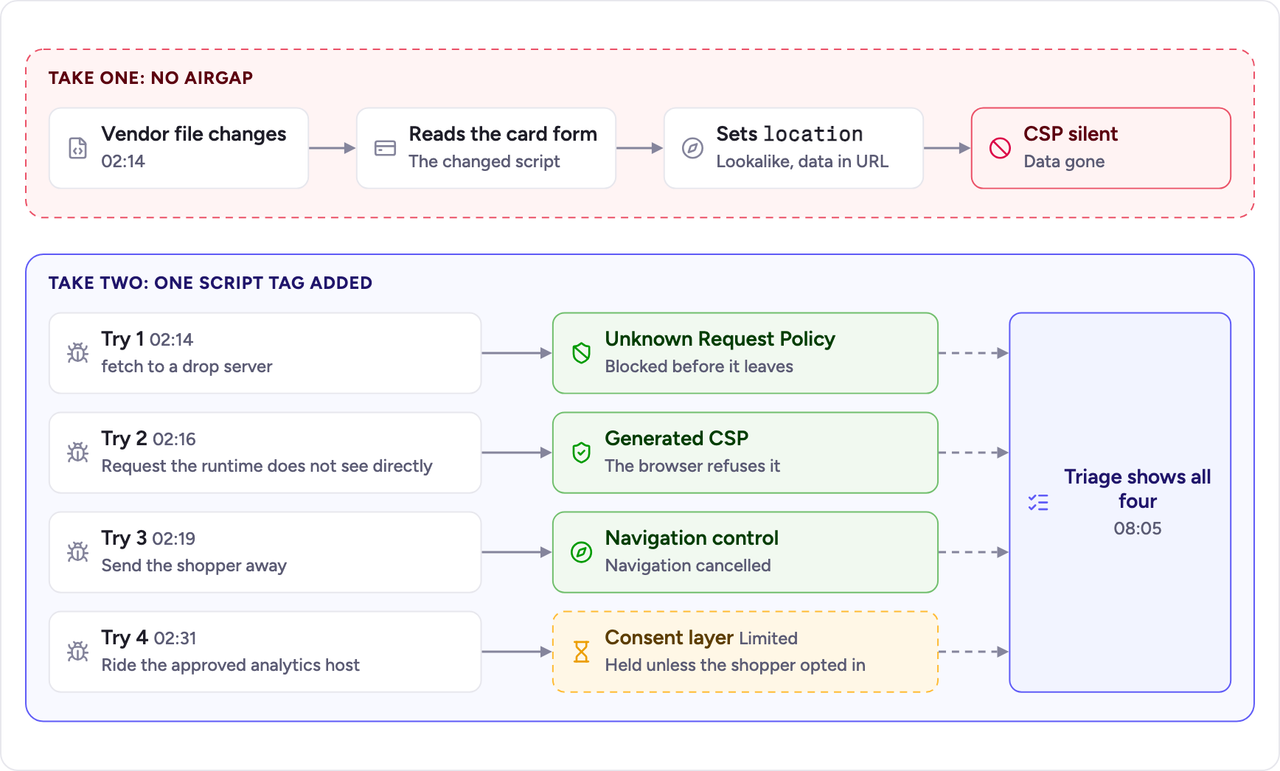
02:14, take one: no Airgap
The same night, with nothing at runtime. Watch where the data goes.
The script waits for the shopper to fill in the form. It reads the name, the address, and the card number. Then it sets location to a lookalike site, with the form data in the query string.
The browser follows. The CSP has no rule for navigations, so it has nothing to report. The shopper lands on a page that looks like yours. The data is gone.
No alert fires. The team learns weeks later, from someone else.
The turn
Run that night again. Change one thing.
Three weeks earlier, your team put one script tag at the top of the checkout page's head. It loads first. Tonight it looks like this:
<script
  src="https://transcend-cdn.com/cm/<BUNDLE_ID>/airgap.js"
  data-regulate-navigation="on"
></script>
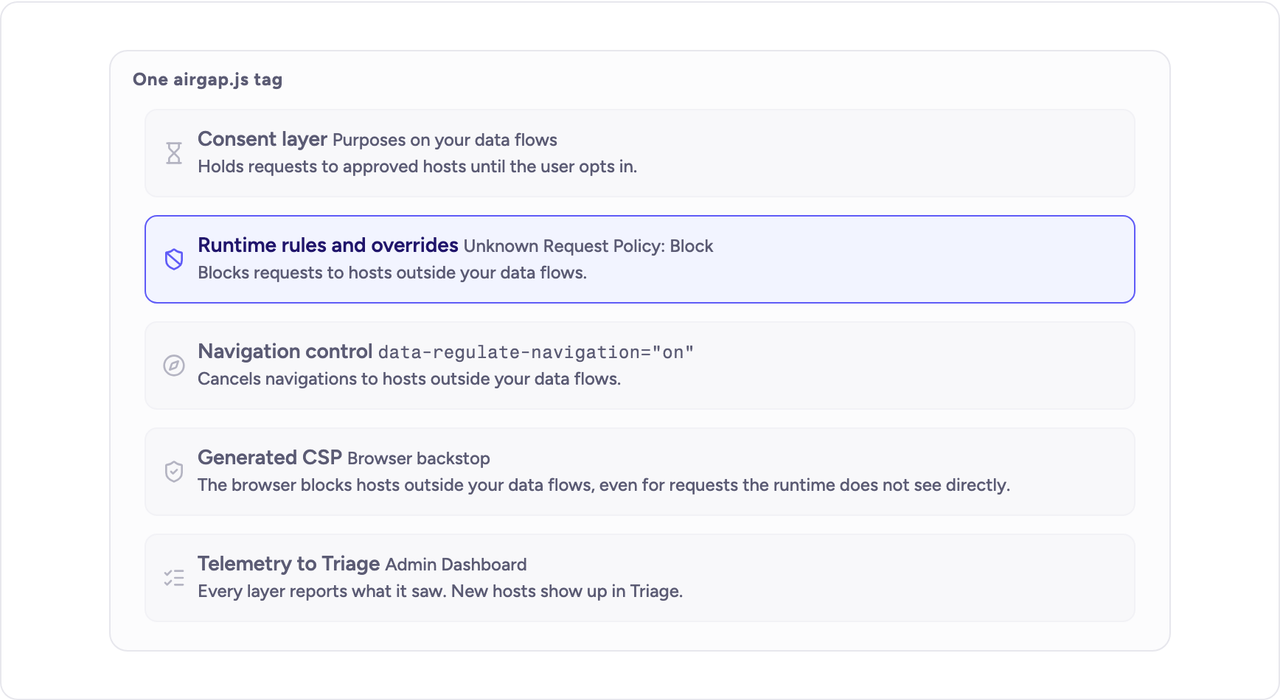
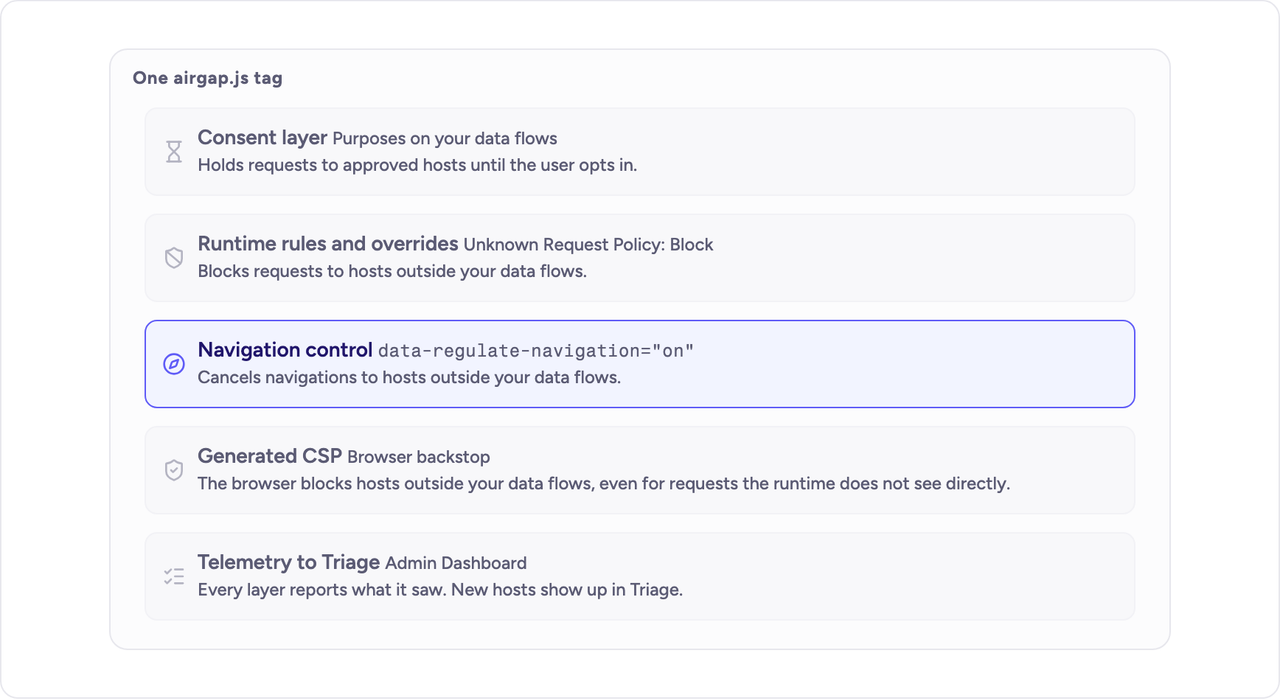
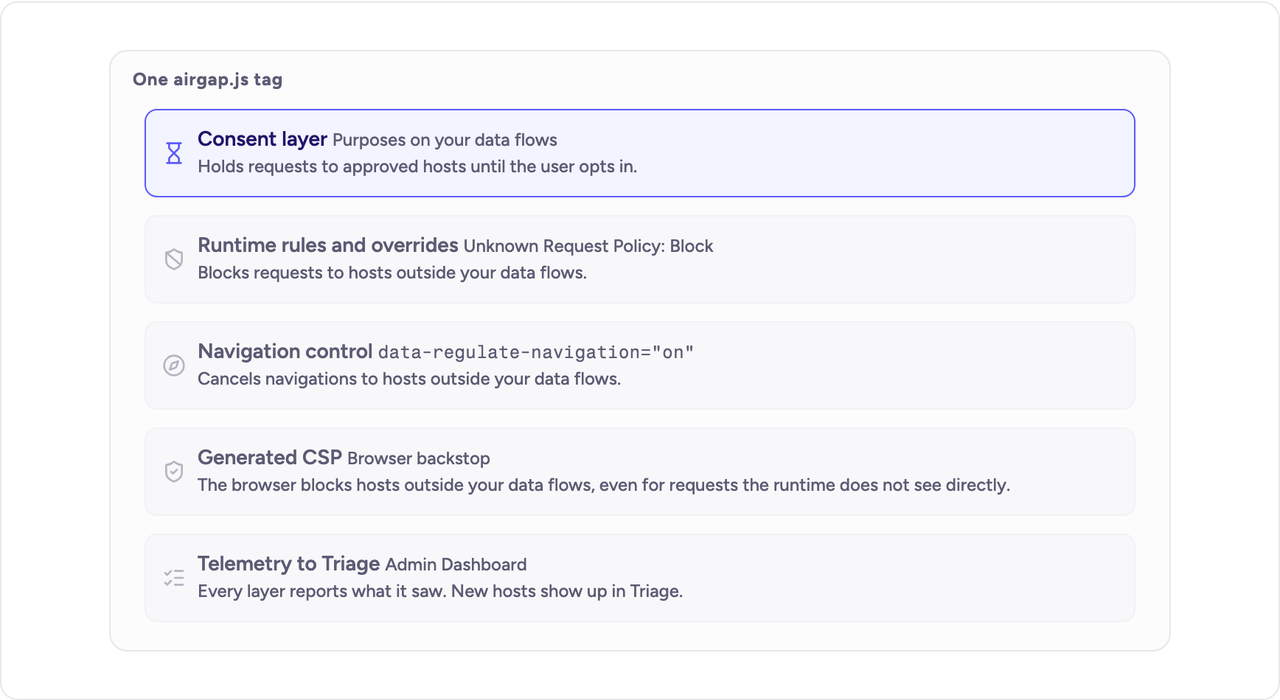
That is the whole install. The script is airgap.js, the browser script behind Airgap. It checks each network request, inserted script, cookie, and navigation before it happens. Then it allows, blocks, holds, or rewrites each one based on your rules.
The guest list still works the door. Airgap watches where each guest goes once inside.
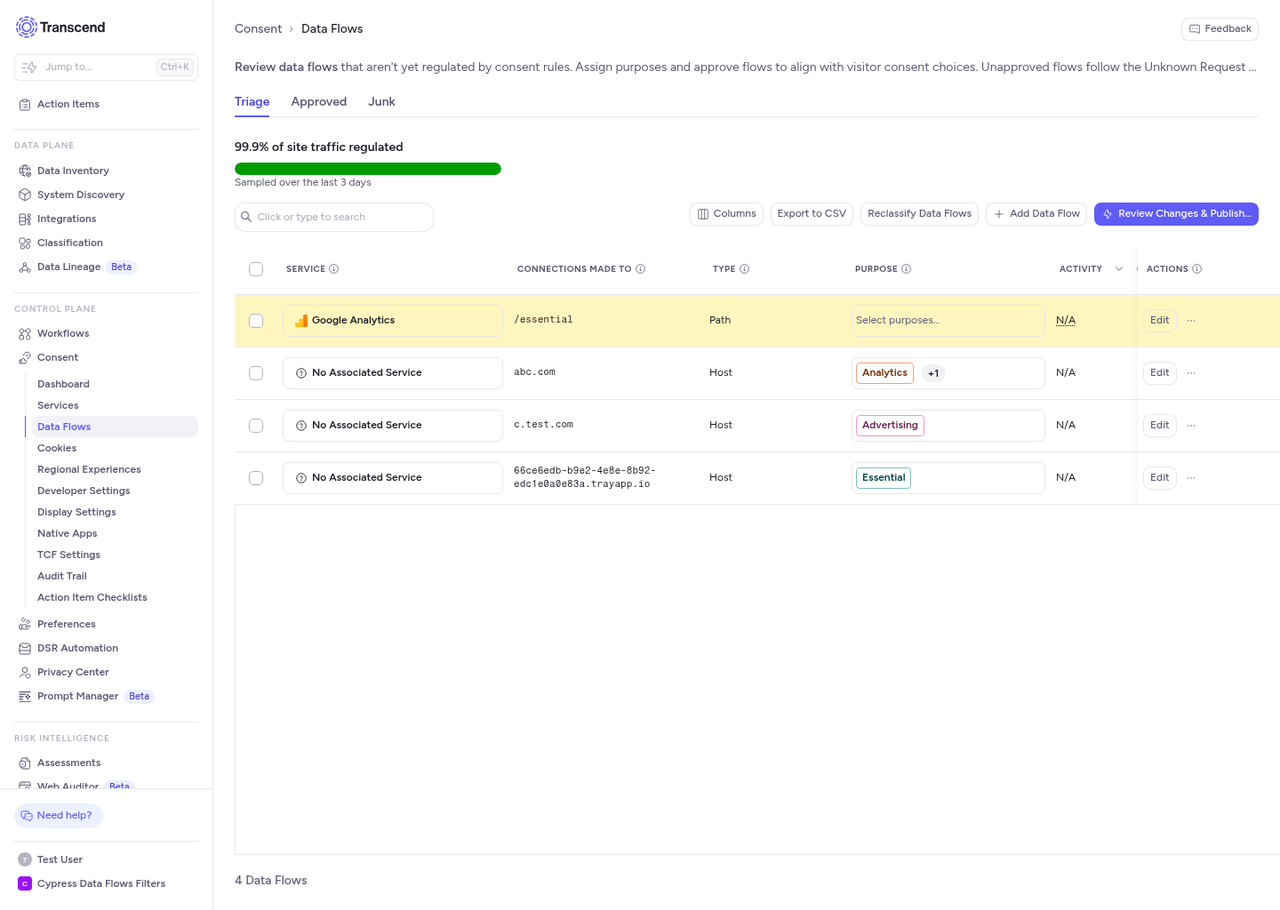
Your rules come from the data flows your privacy team already keeps. In the dashboard, the Unknown Request Policy is set to Block. That policy decides what happens to a request to a host nobody classified.
Same store. Same shopper. Same few new lines. This time, the script needs four tries.
02:14, try 1: a request to a drop server
Stopped by: the Unknown Request Policy.
The script takes the simple route. It calls fetch on a server the attacker owns, with the form data in the body.
Airgap checks the host. Nobody classified it, so the policy says Block. The request never leaves the browser. The call to fetch returns a promise that never settles, so the script waits for an answer.
It will wait a long time. Remember that promise.
This holds for every shopper, including the ones who accept everything. In the demo, the request is blocked.
One attempt stopped. The card data is still on the page.
02:16, try 2: a style rule
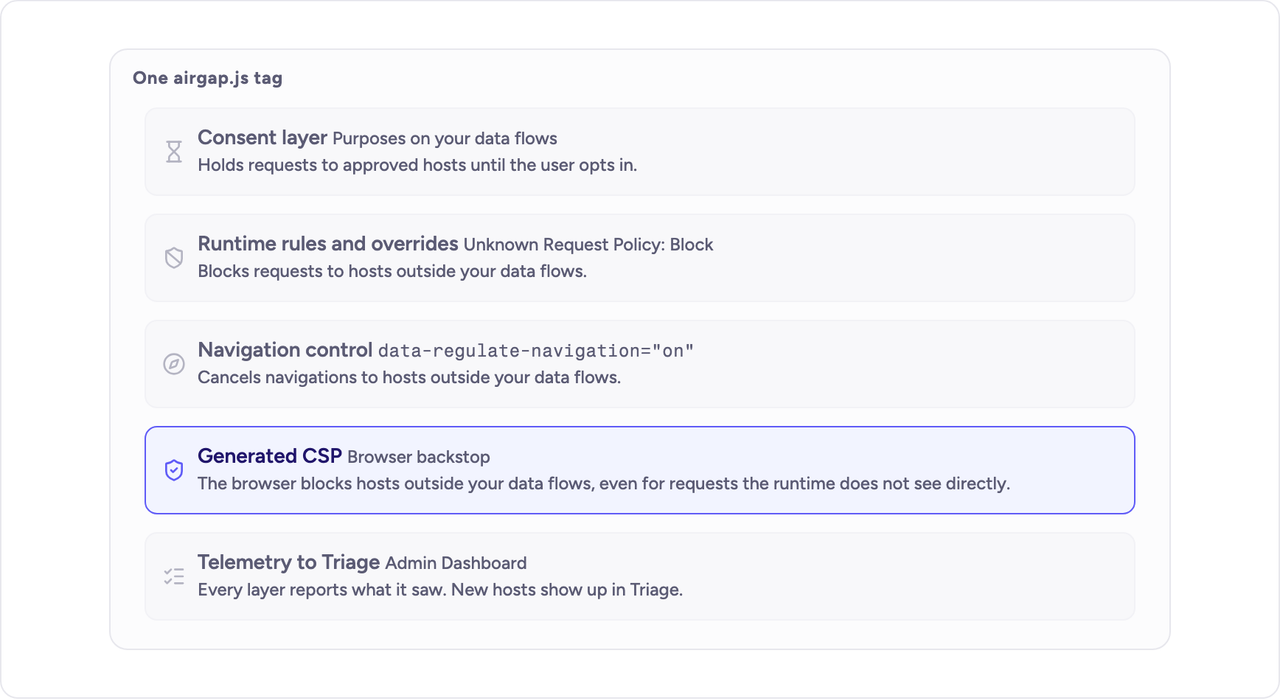
Stopped by: the generated CSP.
The script gets quieter. It injects a style rule. The rule sets a background image, and the image URL carries the data to the attacker's host. No fetch. No new script. Nothing that looks like a request.
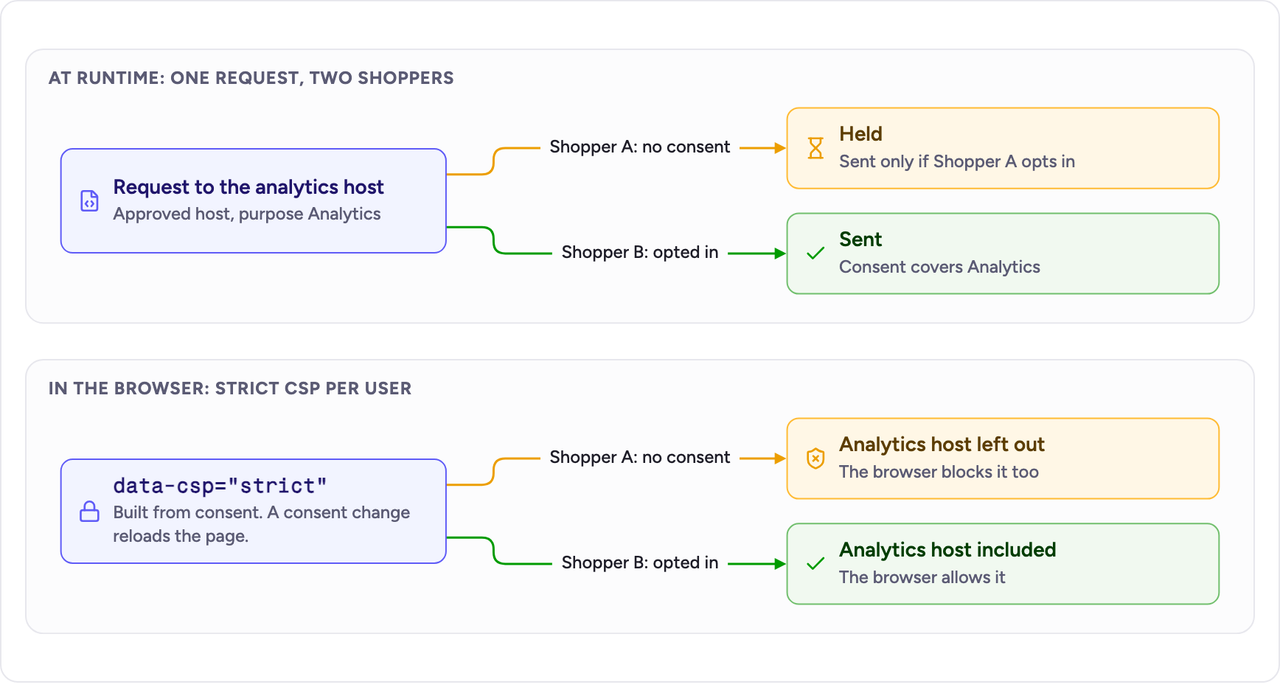
Airgap's runtime does not watch stylesheets directly. The generated CSP does. When blocking is on, Airgap writes a CSP into the page from your data flows. The browser reads it and refuses the image. No request leaves.
Airgap also records the violation. The runtime never saw this request, so the entry tells you the browser caught something the runtime missed.
Two attempts stopped, and nothing has left the page.
02:19, try 3: send the shopper away
Stopped by: navigation control.
Back to the move that worked in take one. The script sets location to the lookalike site, with the data in the query string.
The tag from the turn includes data-regulate-navigation="on". Airgap listens for navigations through the browser's Navigation API and treats each one like a request. This host is unknown, so Airgap cancels the navigation. The shopper stays on your checkout page.
One limit belongs here. Most navigation coverage needs a browser with the Navigation API. Without it, navigation control covers only form submissions and window.open().
Three attempts stopped. The script still ran, but the data never left.
02:31, try 4: an approved host
Stopped by: the consent layer, for shoppers who haven't opted in.
This one works. Sort of.
The script has had twelve minutes to think. The page already talks to an analytics vendor. The script sends the data there, on the attacker's own account.
The host is approved. The CSP allows it. The Block policy allows it. Airgap still has one layer left. The host is classified under analytics, and consent applies at runtime. For a shopper who has not agreed to analytics, Airgap holds the request.
For a shopper who has agreed, the request goes out.
That is the limit, and it is why this story has a try 4. Airgap authorizes by host and URL, and this host is approved. Pair Airgap with Subresource Integrity and a script change-detection tool.
By morning: three attempts stopped, and one limited to shoppers who opted in.
08:05, Triage
You open the Admin Dashboard before coffee. Triage lists what the page tried overnight: a host nobody approved, a navigation that was cancelled, and a CSP violation. Each item waits for your decision.
Try 4 needs more than a decision. The fix is a custom override, a small function your team registers before Airgap loads. It runs on every request, including requests to approved hosts. This one watches the analytics host and blocks any request that carries an account other than yours. It ships in one pull request.
One loose end. The promise from try 1 never settled. If the shopper left that tab open, the script is still waiting.
Setting this up in Transcend takes one small function. Our request overrides guide walks through it.
Rewind: five steps
Rewind three weeks. Your team did not start with Block. They put the same tag in report-only mode and watched.
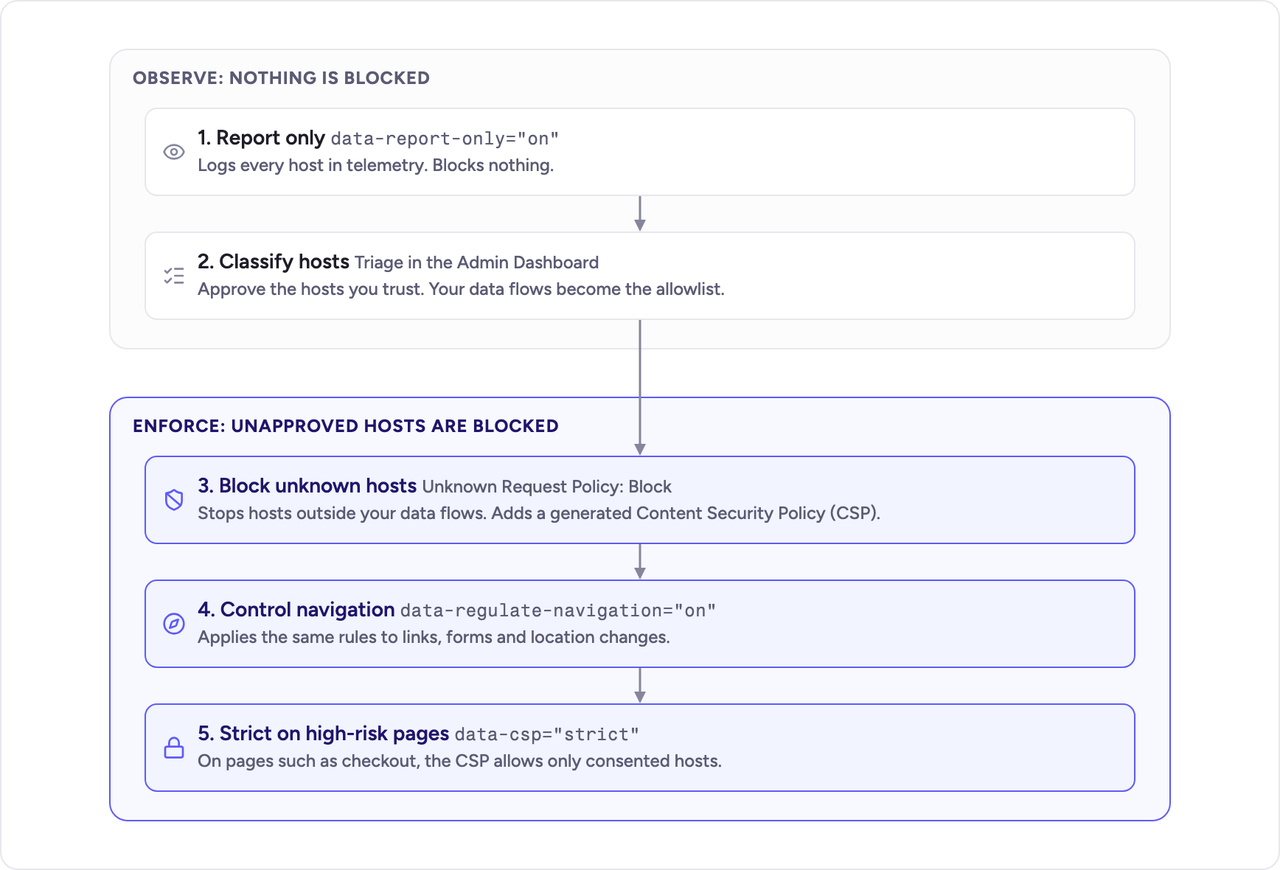
- Report-only. Airgap watches and records what loads, and blocks nothing.
- Classify. Review the hosts you see and add them to your data flows.
- Block unknown requests. The lax CSP turns on.
- Turn on navigation control, starting with data-regulate-navigation="report-only".
- Go strict where it's warranted, usually checkout and other high-risk pages.
Starting with security controls is reasonable, but it doesn't change your consent obligations. Work with your privacy team so consent requirements are met wherever they apply.
Where Airgap stops, and how to close the gap
Airgap controls where the browser can connect, which is one part of a client-side security program. Here's where its coverage stops and what to pair it with:
- It doesn't analyze what a script does on an allowed host. If you need behavioral analysis, use a dedicated tool. Narrow the gap: a custom override runs on every request, including requests to approved hosts. It can read the URL and the request, then block it, rewrite it, or drop its credentials. Cookie overrides do the same for cookie writes.
- The generated CSP allows inline scripts and eval so existing sites keep working. It doesn't replace a nonce-based or hash-based script-src policy for cross-site scripting defense. Keep that policy in your header if you're using it. No override changes this one.
- Without strict CSP, Airgap doesn't yet regulate CSS and SVG subresources directly. Close the gap: turn on strict CSP for high-risk pages. The lax CSP still refuses hosts outside your data flows, as in try 2.
- Navigation control can't intercept navigations the browser starts itself (the address bar or the back and forward buttons), and full coverage needs a browser that supports the Navigation API. Narrow the gap: for the navigations it does see, an override can strip the query string, rewrite the destination, or cancel the navigation.
- Airgap has to load before other scripts. It can't regulate a script that runs before it. The upside: overrides need proof that your code was there when Airgap loaded. A script injected later cannot register its own.
Each of these is a setting or a few lines of code in Transcend. To get started, see our guides to request overrides and navigation control.
The takeaway for security leaders
Keep your CSP. Add a runtime layer that knows what each user agreed to, sees dynamic requests, and controls where users go. That's what Airgap is: a browser-side network boundary that produces a CSP as a byproduct, maintained from the same data flows your privacy team already keeps.
Airgap also powers Transcend's consent and tracker management, which Gartner evaluated when it named Transcend a Leader in the 2026 Gartner® Magic Quadrant™ for Privacy UX.
For the technical details, read airgap.js as a Browser Security Control in our docs. To see it work, fork the examples repo. To see what's running on your own sites, talk to us about a scoped pilot: one public property and one internal app, in report-only mode, measured against your success criteria.


More resources

Gartner and Magic Quadrant are trademarks of Gartner, Inc., and/or its affiliates. Gartner, Magic Quadrant for Privacy UX, by Shadrock Roberts, Stefan Dumitrescu, Bernard Woo, October 6, 2026. ID G00841462. Gartner does not endorse any company, vendor, product or service depicted in its publications, and does not advise technology users to select only those vendors with the highest ratings or other designation. Gartner publications consist of the opinions of Gartner's business and technology insights organization and should not be construed as statements of fact. Gartner disclaims all warranties, expressed or implied, with respect to this publication, including any warranties of merchantability or fitness for a particular purpose.